Hardware catalogue
Hardware Catalogue
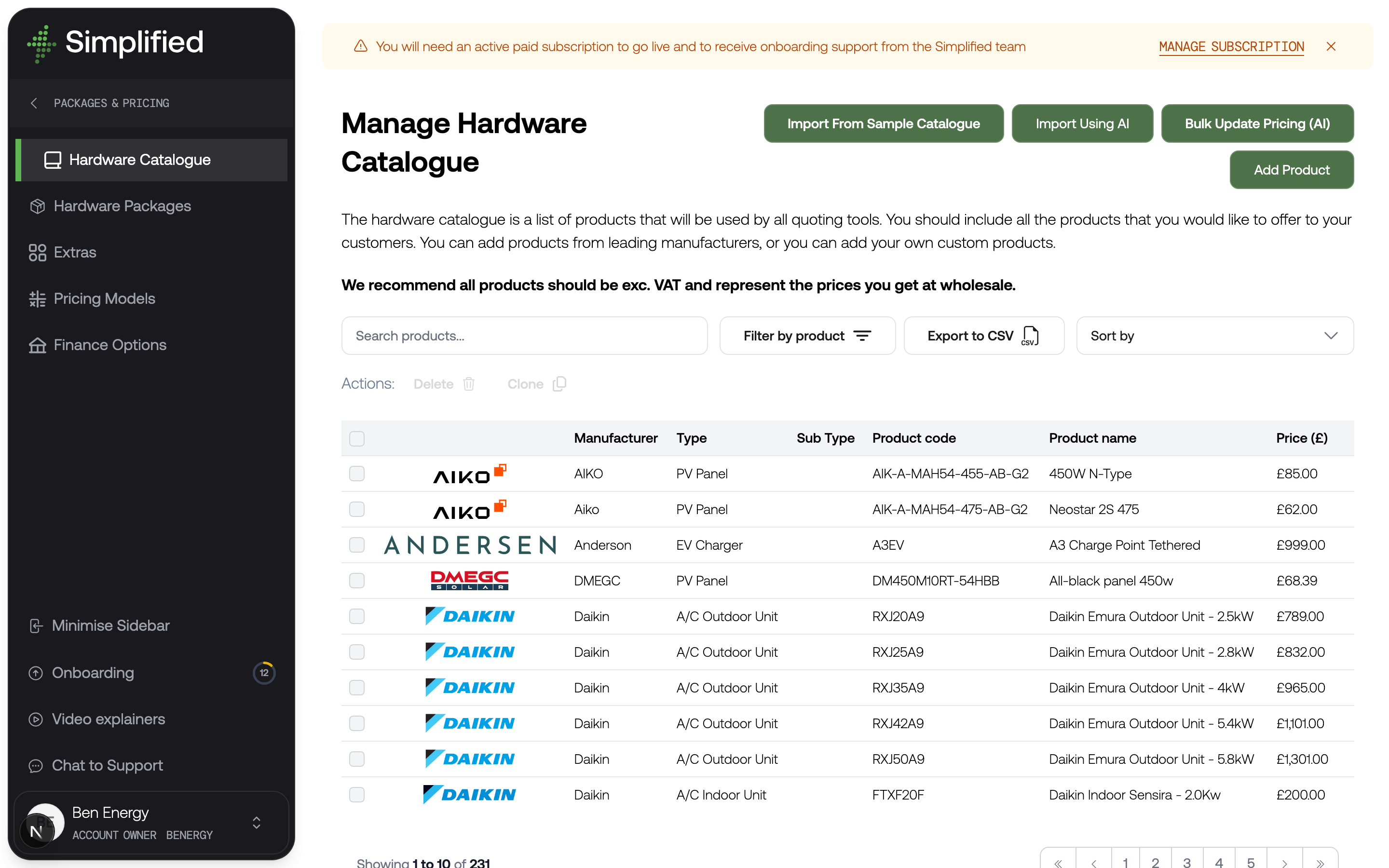
Your hardware catalogue is the single list of products you sell. Every quoting tool reads from it, and every price your customers see is ultimately built from the costs you record here.
Find it under Settings → Hardware, Packages & Pricing → Hardware Catalogue.
Why it matters
Nothing else in the pricing chain works without it. A hardware package is a selection of catalogue products; a pricing model calculates from their costs. If a panel's cost is wrong in the catalogue, it is wrong in every quote that includes that panel, across every tool.
The catalogue also carries the product information your customers read — descriptions, images, manufacturer logos, and datasheets — so it does double duty as your product marketing library.
Enter costs excluding VAT, at wholesale
Record what you actually pay for a product, excluding VAT. Simplified recommends this convention throughout, and pricing models assume it.
This matters because your selling price is not stored anywhere. It is calculated at quote time from these wholesale costs plus whatever your pricing model adds for labour, scaffolding, overhead, and margin. Enter a retail price here and you will end up marking up your own markup.
Product types
When you add a product you choose its type first. The type determines which technical fields you get, because the specifications that matter for a panel are not the ones that matter for a boiler.
Solar
- PV Panel
- Optimiser
Inverters
- Hybrid Inverter
- String Inverter
- Micro Inverter
- AC Coupled Inverter
Batteries and gateways
- Battery
- Battery Expansion Pack
- Stackable Battery Master
- Stackable Battery Master with Storage
- Stackable Battery Slave
- Stackable Battery Base
- Combined Hybrid Inverter Battery
- Combined AC Coupled Inverter Battery
- Backup Gateway
EV
- EV Charger
Heating and hot water
- Air Source Heat Pump
- Water Cylinder
Boilers and tanks
- Boiler
- Cold Water Storage Tank
Air conditioning
- A/C Indoor Unit
- A/C Outdoor Unit
- A/C Outdoor Unit (Multi Split)
Other
- Generic Product
Choose the most specific type that fits. Type drives more than the form: it determines which packages a product can go into, and it is how pricing models count what is in a system. A battery recorded as a Generic Product will not be counted as a battery by anything.
What a product holds
Every product, whatever its type, has these fields:
| Field | Notes |
|---|---|
| Product Name | Required. The manufacturer's name for it. |
| Product Code | Required. The manufacturer's part number. |
| Alternative product codes | Other codes the same product is known by. Used to match products when importing designs from external tools. |
| Description | Supports formatting. Customer-facing. |
| Cost (excl. tax) | Required. Your wholesale cost. |
| Manufacturer | Required. |
| Manufacturer Logo | Optional. Shown on package cards. |
| Product-Specific Images | A primary image plus additional images. |
| Single / Three Phase Compatible | Which electrical supplies the product can be used with. |
| Datasheets | PDF or document uploads, each with a title and a Show in UI option. |
Type-specific fields sit alongside these. A PV Panel adds dimensions and peak power in watts; a Battery adds usable capacity, depth of discharge, and voltage; a Boiler adds fuel type, system type, and heating output. Fill in as much as you can — pricing models and customer-facing calculations read these values, so a missing peak power means a solar design cannot size itself correctly.
Datasheets and "Show in UI"
Each datasheet has a Show in UI option. Turn it on and your customer can open the datasheet from a quote or proposal. Turn it off and the document is still uploaded and still used to inform product data, but it stays internal.
Phase compatibility
The Single Phase Compatible and Three Phase Compatible toggles are used to filter what a customer is offered. A three-phase-only inverter will not be offered to a single-phase property. Set these honestly or customers will be quoted systems that cannot be installed.
Four ways to fill the catalogue
Typing several hundred products in by hand is nobody's idea of a good afternoon, so there are shortcuts.
Import from sample catalogue. Loads a set of commonly used products across solar, batteries, and heat pumps, maintained by Simplified. The fastest way to get something working. Treat the costs and specifications as a starting point and check them against your own supplier pricing — they are indicative, not yours.
Import using AI. Upload up to ten manufacturer datasheet PDFs at a time and the technical fields are extracted for you. You review what was extracted, choose which products to import, and can assign shared images across them before confirming. Good for adding a new manufacturer's range.
Add product manually. Pick the type and fill in the form. Best for one-offs and for anything where you want full control.
Bulk update pricing. Upload a spreadsheet of costs and it is matched against your existing products by code, alternative code, or name. You review and edit the matches before anything is applied. This is the one to use when a supplier sends a new price list.
Whichever route you take, check the results. Imported and AI-extracted data is a draft, not gospel — particularly costs.
Keeping it current
Your catalogue is not a one-off task. Costs move, and because prices are calculated at the moment a customer sees them, an out-of-date catalogue quietly erodes your margin on every quote.
The bulk pricing update is designed for this. When a supplier price list lands, upload it rather than editing products one at a time.
You can also export the catalogue to CSV, which is useful for reviewing costs away from the product or sharing them with whoever manages your purchasing.
Check it worked
- Open Settings → Hardware, Packages & Pricing → Hardware Catalogue.
- Confirm your key products are listed with sensible costs.
- Open one and check its type-specific fields are filled in, particularly peak power for panels and capacity for batteries.
- Confirm phase compatibility is set correctly.
What's next
Group these products into the options your customers choose between: Hardware packages.