Hardware packages
Hardware Packages
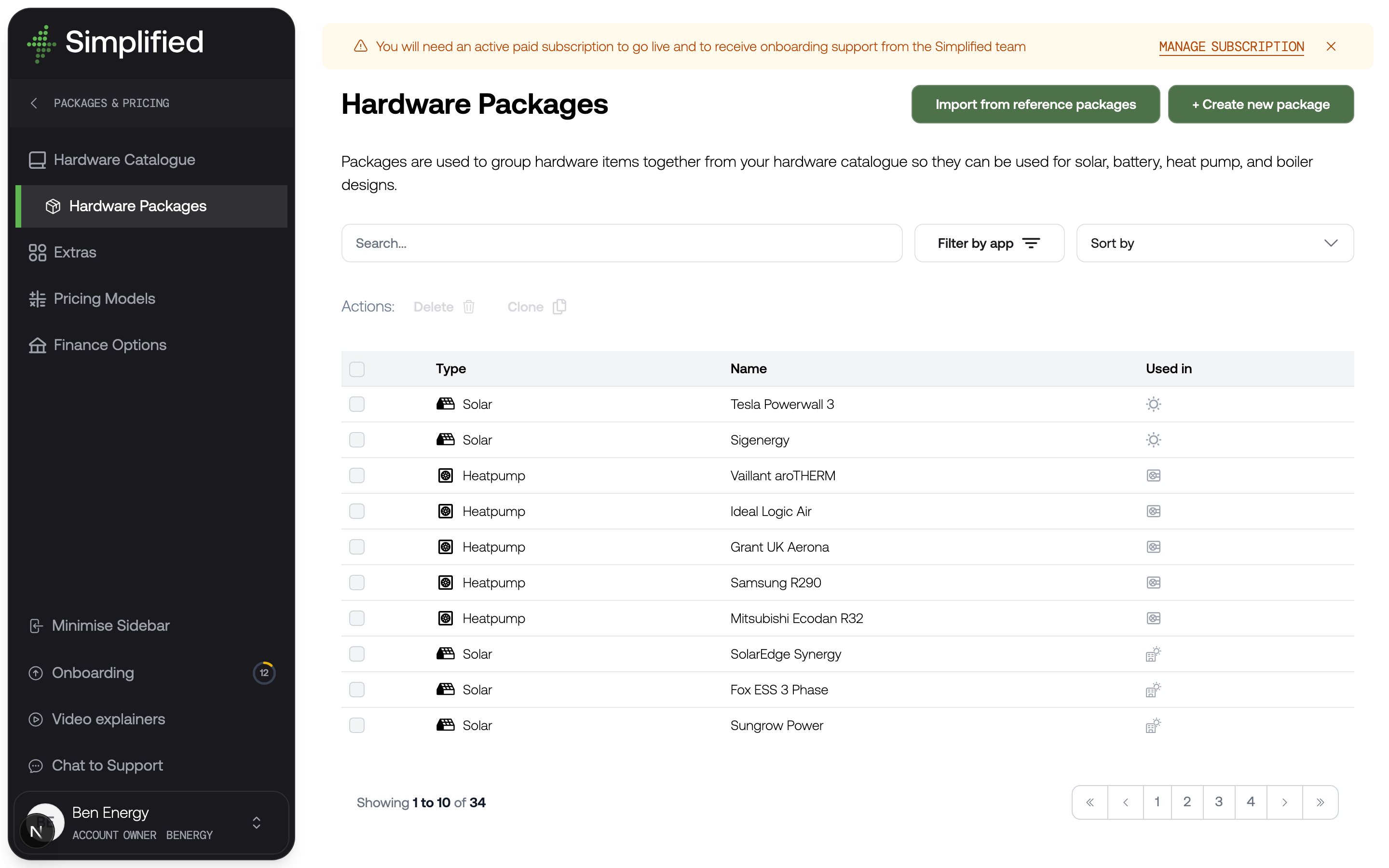
A hardware package is one of the options your customer chooses between — typically your good, better, and best systems. Packages group products from your hardware catalogue and carry the marketing content and pricing rules that turn a list of parts into something sellable.
Find them under Settings → Hardware, Packages & Pricing → Hardware Packages. The Used in column tells you at a glance which quote tools currently offer each package.
A package is a pool, not a fixed bill of materials
This is the most important thing to understand, and it is not obvious.
You might expect a package to be a fixed list: twelve panels, one specific inverter, one battery. It is not. A package holds a pool of valid products, and the quote tool picks the right ones for the property in front of it.
So a solar package might contain three inverter models and four battery sizes. When your customer designs a twelve-panel array on their roof, the tool selects the inverter that suits twelve panels of that wattage, and the battery size matching what they asked for. A different customer with a twenty-panel roof gets a different inverter from the same package.
This is why you build far fewer packages than you might expect. You are not creating a package per system size — you are creating a package per proposition, and letting it scale.
Why it matters
Packages are what your customer actually sees and compares. They carry the name, images, description, and marketing highlights that make one option feel worth more than another, and they hold the pricing rules that produce the number.
A quote tool with no published packages has nothing to show, so this is the step that takes you from a configured account to a working quote tool.
Package types
When you create a package you choose its type, which determines which quote tool can use it and which product types it can contain:
| Type | Can contain |
|---|---|
| Solar Package | Panels, all inverter types, batteries and stackable batteries, all-in-one inverter-batteries, optimisers |
| Battery Package | Inverters, batteries and stackable batteries, all-in-ones, backup gateways |
| Heat Pump Package | Air source heat pumps, water cylinders |
| Boiler Package | Boilers, water cylinders, cold water storage tanks |
| Air Con Package | Indoor units, outdoor units, multi-split outdoor units |
Solar packages are also used by the Commercial Solar Quote Tool.
What a package holds
Name and products
The Name is customer-facing. Pick the products from your catalogue — you are offered only the types valid for the package type.
Description and marketing
The Description supports formatting and is the main body of customer-facing copy. There is an AI content generator if you want a starting point to edit.
Badges and Marketing highlights are the short pieces of text that make a package card persuasive — "Most popular", "Best value", "20-year warranty". These do a disproportionate amount of selling, so they are worth more thought than their size suggests.
Electrical supply compatibility
Toggles for Single Phase and Three Phase. A package is only offered to customers whose supply matches. Get this wrong and either customers see systems they cannot have, or they see nothing at all.
Media
You can supply a main brand logo, a main package image, additional images, a principal datasheet, and videos with straplines.
Alternatively, turn on Use dynamic images and the package pulls images and manufacturer logos from whichever products the tool actually selected. This keeps a card honest — the customer sees the battery they are being quoted, not a generic photo — and saves maintaining images per package.
Solar and battery system rules
Solar and battery packages get extra options controlling how the tool assembles a system:
- Constrain to UK DNO G98 limits where possible — keeps designs inside the limits that avoid a DNO application.
- Always include optimisers — solar only.
- Max battery expansion packs per combined inverter-battery.
- Stackable battery slaves per master — minimum and maximum, and whether stacks must be identical or may mix sizes.
These exist because battery and inverter combinations have real physical and regulatory constraints, and you want the tool to respect them without a human checking every quote.
Air con combination ratio
Air con packages get an optional Multi-split combination ratio (%). Leave it empty to use the Air Con Quote Tool default. If you set it, that value wins for this package.
100% is the conservative rule: the outdoor must cover the full indoor total. Many multi-split ranges allow 130% or more — copy the figure from the datasheet for that range. The ratio only applies when a multi-split outdoor serves two or more indoor units. A one-to-one pair still needs the outdoor to match or exceed that indoor.
Pricing
Each package is priced one of two ways:
- Pricing Model — attach one of your pricing models. This is the recommended route and what nearly everyone should use.
- Code (Advanced) — a custom formula. Only appropriate with support from us; the interface says as much.
You also set whether VAT applies and at what rate.
Draft and published
New packages start as drafts. A draft is invisible to customers, which lets you build a package over several sittings without half-finished options appearing in a live quote tool.
When you publish, the package is checked for the things it cannot function without: it needs products, a working pricing model or formula, and electrical compatibility set. If any are missing, you will be told rather than discovering it from a customer.
Getting a package in front of a customer
Creating a package is not enough. There are two steps, and forgetting the second is the most common reason a package does not appear:
- Create and publish the package in the library.
- Assign it to a quote tool, on that tool's Hardware Packages tab.
The order you put packages in on the quote tool's tab is the "Recommended" order your customer sees. Your customers can re-sort by price or name, but the order you choose is the default, and defaults get chosen. Put the option you most want to sell where it will be seen.
Why a package might not appear
A package is hidden from a customer if any of these are true:
- It is still a draft.
- It is not assigned to that quote tool.
- Its electrical compatibility does not match the customer's supply.
- It has no pricing model attached, or the model produces no price.
- The tool could not pick a valid set of products from the pool for that property — for example, no inverter in the package suits the panel count the customer designed.
That last one is the subtle one, and it is worth checking whenever a package appears for some customers but not others.
Check it worked
- Publish at least one package for the product type you are quoting.
- Assign it to the matching quote tool under that tool's Hardware Packages tab.
- Open the quote tool and work through to the package selection step.
- Confirm the package appears, in the position you expect, with the image, description, and price you expect.
What's next
Give your packages a price: Pricing models.